Template
Free 1:1 Meeting Tracker Template for Notion
1:1 Meeting Tracker
1:1 Meeting Tracker is a free Notion template that does two things. It flags any direct report you're overdue to meet, based on the cadence you set for them, and it carries each person's open action items from one 1:1 to the next until they're done or deliberately dropped.
Built for managers who want every report to get consistent time, by a former CX/UX researcher in big tech, now a strategist for early-stage startup teams.
Free · Works on the free Notion plan
Get it free on Notion MarketplaceWhy 1:1s slip
Nobody decides to skip a 1:1. One gets moved for a launch, the next gets cut short, and the report who never complains is the one you haven't really talked to in six weeks. A calendar won't catch it, because a recurring event looks the same whether the meeting happened or not.
The quieter failure happens between meetings. Something gets agreed, nobody writes it down, and two weeks later neither of you remembers it came up. People notice. They stop raising things they expect to disappear.
1:1 Meeting Tracker tracks what actually happened, and what's still open.
What's inside: two connected databases
People
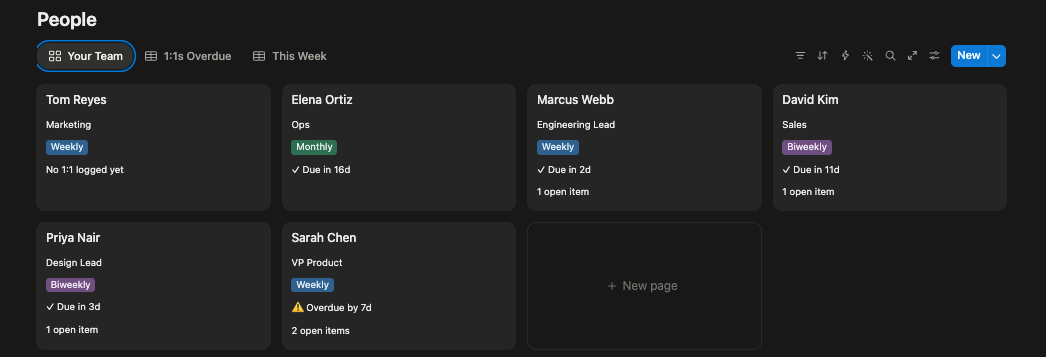
A row for each direct report: their role, the cadence you've agreed, the date of your last 1:1, and the topics you want to raise next time. The Your Team view shows a card for each person with their status ("⚠️ Overdue by 7d," "✓ Due in 3d" or "No 1:1 logged yet") and how many items are still open with them. The 1:1s Overdue view lists everyone past due, longest-neglected first, and This Week shows who's coming due in the next seven days.
Open Items
Every action item from your 1:1s, linked to the person it's with, marked as yours or theirs, and dated when it was raised. The Carry Forward view groups everything still open by person, oldest first. It's the view to open at the start of each 1:1.
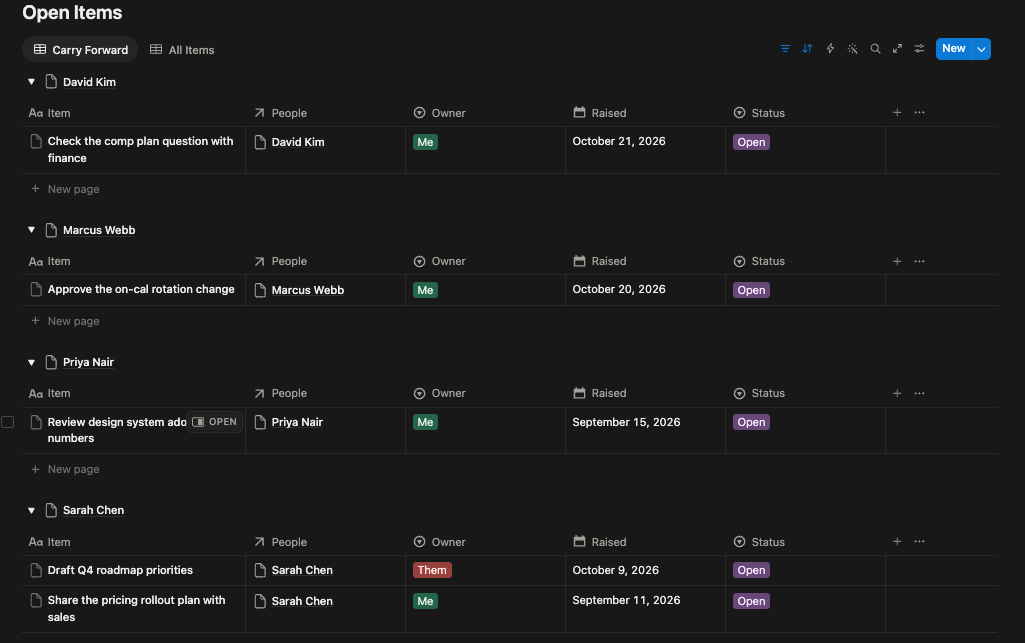
Comes with six sample reports and eight action items, so you can see every status working before you add your own team.
How it works
The overdue flag
Each person's next 1:1 is due a set number of days after the last one, depending on their cadence.
| Cadence | Next 1:1 due |
|---|---|
| Weekly | 7 days after your last 1:1 |
| Biweekly | 14 days after your last 1:1 |
| Monthly | 30 days after your last 1:1 |
Once that date passes, the person is flagged as overdue. Log a new 1:1 date and the flag clears. Someone you haven't met yet shows "No 1:1 logged yet" instead of overdue, so a new hire doesn't start out flagged.
Carry-forward
An item stays open until you mark it Done or Dropped, and it shows in Carry Forward at every 1:1 until then. Dropped is a real status on purpose: deciding not to do something is different from forgetting it, and both of you should be able to see which one happened.
Most of the items that go missing are the manager's. Marking each item as yours or theirs makes that visible.
The tracker covers two of the four things that make 1:1s work: whether they happen, and whether what's agreed gets done. To check all four, take the free assessment Are Your 1:1s Actually Working?
Who it's for
- New managers building the habit of regular 1:1s.
- Managers with four or more reports, where someone is always the one who slips.
- Managers who've inherited a team and want a clean record from day one.
Who it isn't for
- Managers who want 1:1s connected to the rest of their week: meetings, priorities and decisions. Executive OS does that.
- Organizations that need 1:1 tracking across many managers, with reporting for HR.
Questions about tracking 1:1s
How do I keep track of 1:1s with my direct reports?
Record the date of your last 1:1 with each person and the cadence you've agreed, then work out when the next one is due. Your calendar shows what was scheduled, not what happened, so it won't tell you when someone has slipped. 1:1 Meeting Tracker does that calculation and flags anyone overdue.
Is there a free 1:1 template for Notion?
Yes. 1:1 Meeting Tracker is free on the Notion Marketplace and works on the free Notion plan, on web, desktop and mobile.
What should I do if I've missed several 1:1s with someone?
Book the next one soon, and say plainly that they've slipped. Start with whatever is still open from last time, then ask what's changed for them since you last talked properly. Don't spend it catching up on status.
Can I use it for skip-levels or mentees too?
Yes. Any recurring one-on-one works. Add each person as a row with their own cadence, and use Role / Team to label who they are.
Can I set a cadence other than weekly, every two weeks or monthly?
Yes. Add an option to Cadence, then add its number of days to the Next 1:1 due formula. The formula is short and editable.
What's the difference between this and Executive OS?
1:1 Meeting Tracker covers your 1:1s: who you're overdue to meet, and what's still open with each person. Executive OS is the full system it comes from, connecting 1:1s to meetings, team-wide action items, priorities and a decisions log.
Get 1:1 Meeting Tracker
Free · Works on the free Notion plan
Get it free on Notion MarketplaceDelivered through the Notion Marketplace.
Related
- Are Your 1:1s Actually Working? (free tool): score your 1:1s on consistency, ownership, follow-through and growth.
- Executive OS: the full operating system for managers, with 1:1s, meetings, action items, priorities and decisions in one place.
- All templates for people managers
Last updated: