Template
Notion Operating System for Managers
Executive OS
Executive OS is a Notion template that connects the five things a manager tracks every week: quarterly priorities, meetings, the action items that come out of them, 1:1s with direct reports, and a log of decisions and why they were made. Each one links to the others, so an action item knows which meeting it came from and a decision keeps the alternatives it was weighed against.
Built for managers, team leads and founders, by a former CX/UX researcher in big tech, now a strategist for early-stage startup teams.
$49 · Works on the free Notion plan
Buy on Notion MarketplaceWhy manager systems fall apart
Most managers run their week from five places: a calendar, a notes app, a task list, a doc of 1:1 notes, and memory. Each one works on its own. The trouble is in the gaps between them.
An action item agreed in a meeting never reaches the task list. A decision gets argued again in March because nobody wrote down in January why it was made. A report you meet every two weeks hasn't had a 1:1 in five, and nothing flagged it.
Executive OS puts all five in one place and links them, so what comes out of a meeting has somewhere to go.
What's inside: five connected databases
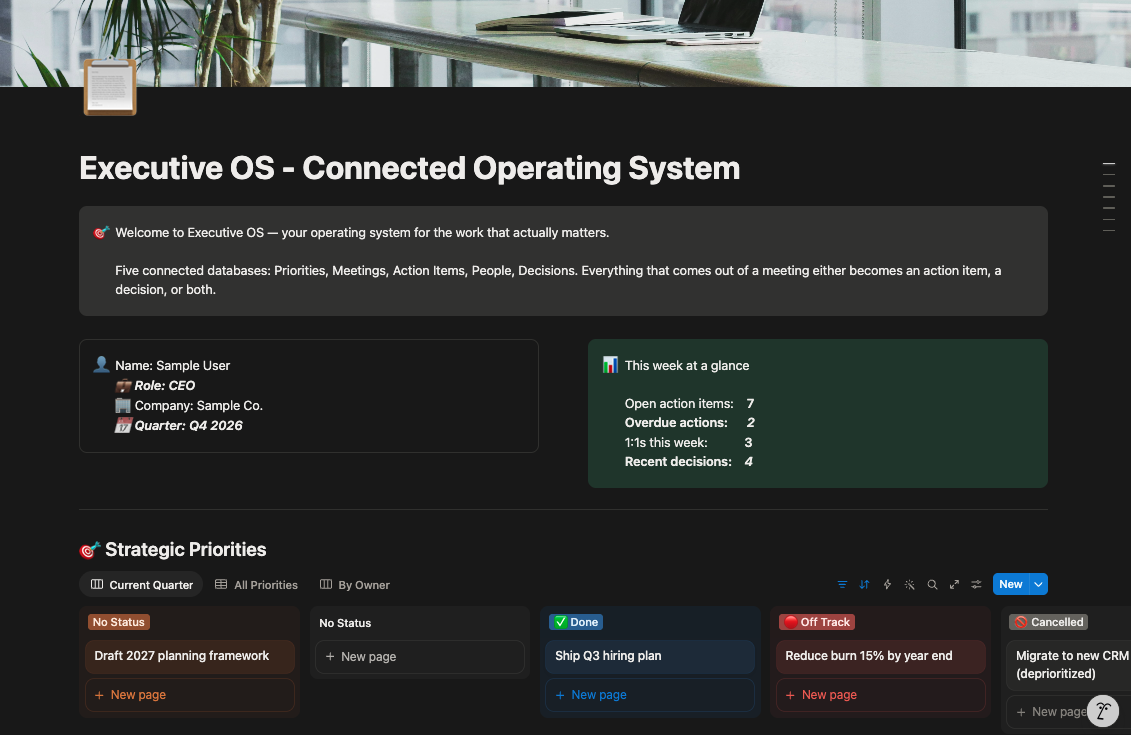
Priorities
Your three to five priorities for the quarter, each with an owner, a key result and progress. The Current Quarter board groups them by status, so you can see what's stalled at a glance.
Meetings
Every meeting with its type, attendees, outcomes and follow-ups. Views for the calendar, this week, meetings that still need follow-up, and a board by meeting type.
Action Items
Every action item, linked to the meeting it came from. Views for overdue, blocked, this week and by priority. An item only counts as overdue if it's past due and not done, so finished work never shows up as late.
People
Your direct reports, each with a 1:1 cadence and the date of your last 1:1. The 1:1s Overdue view shows anyone you haven't met with in too long.
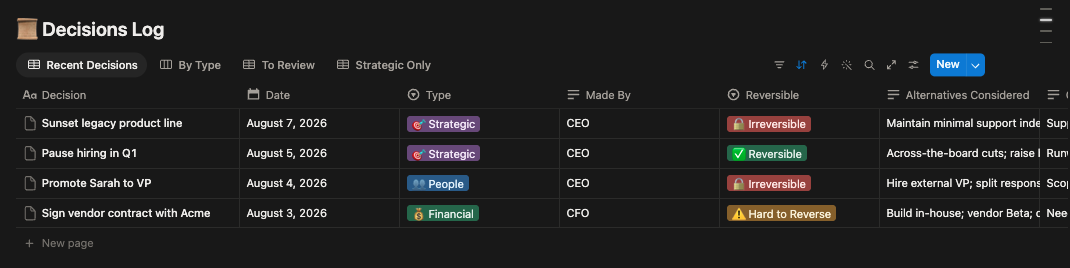
Decisions Log
Every decision worth defending, with the context, the reasoning and the alternatives you considered. Each one is tagged Reversible, Hard to Reverse or Irreversible, so you know which deserve more time.
Also included: a Weekly Review template for fifteen minutes on Friday, and a reading list.
Comes with sample priorities, meetings, action items, direct reports and decisions, including an overdue action item and an overdue 1:1, so you can see every view working before you add your own.
How it works
A twenty-minute week
Once it's set up, Executive OS takes about twenty minutes a week.
| When | What | Time |
|---|---|---|
| Monday | Check overdue action items, overdue 1:1s and this week's meetings | 5 minutes |
| After each meeting or 1:1 | Log the outcome and any action items, linked to the meeting | 1–2 minutes each |
| Friday | Weekly Review: what got done, what didn't, what carries over | 15 minutes |
Decisions by reversibility
Not every decision deserves the same amount of thought. Tagging each one by how hard it is to undo tells you where to spend your time.
| Tag | What it means | How to treat it |
|---|---|---|
| Reversible | Easy and cheap to undo | Decide quickly; you can change course |
| Hard to Reverse | Possible to undo, but costly | Take a day, and get one more view |
| Irreversible | Can't be undone | Slow down, and write down the alternatives |
Six months later, when someone asks why a decision was made, the answer is already written down, including what else you considered.
Who it's for
- Managers and team leads who run their week from several tools and lose things in between them.
- Founders managing a small team without an operations function.
- New managers who want a system in place before habits form.
Who it isn't for
- Teams looking for a shared project management system. Executive OS is one manager's system, not a workspace for everyone's work.
- Managers who only need to keep 1:1s on track. The free 1:1 Meeting Tracker does that.
Questions about running a team in Notion
How should a manager organize their week in Notion?
Keep priorities, meetings, action items, 1:1s and decisions in linked databases instead of separate pages. The links are what make it work: an action item tied to its meeting, and a meeting tied to the priority it serves. Executive OS is built that way, with five connected databases.
How do I keep a decision log?
For each decision, record the date, the context, the alternatives you considered, the reasoning, and how hard it would be to reverse. Write it when the decision is made, not later, because the alternatives are the first thing people forget. The Decisions Log in Executive OS has a field for each of these.
How do I make sure meeting action items actually get done?
Give every action item an owner and a due date, link it to the meeting it came from, and check the overdue list every week. Count an item as overdue only if it's past due and not done; otherwise finished work clutters the list and people stop trusting it.
How many priorities should a manager have per quarter?
Three to five. Each should have an owner and a key result that shows whether it worked. Anything beyond five is usually a task, and treating tasks as priorities is how priorities stop meaning anything.
What's the difference between Executive OS and the free 1:1 Meeting Tracker?
1:1 Meeting Tracker covers your 1:1s: who you're overdue to meet, and what's still open with each person. Executive OS connects 1:1s to meetings, team-wide action items, quarterly priorities and a decisions log.
Does Executive OS work on the free Notion plan?
Yes. It works on the free plan, on web, desktop and mobile. It's a one-time purchase on the Notion Marketplace.
Get Executive OS
$49, one-time · Works on the free Notion plan
Buy on Notion MarketplacePayment, delivery and updates are handled by the Notion Marketplace.
Related
- 1:1 Meeting Tracker (free template): track who you're overdue to meet, and carry open items forward.
- Are Your 1:1s Actually Working? (free tool): score your 1:1s on consistency, ownership, follow-through and growth.
- Performance & Feedback Tracker: log feedback when it happens, not the week reviews open.
- All templates for people managers
Last updated: