Template
Competitor Tracking Template for Notion
Competitor Intelligence Tracker
Competitor Intelligence Tracker is a Notion template for tracking what competitors do: launches, pricing changes, funding, hiring and positioning shifts, each logged as a signal against the competitor it's about. It also tracks how long it's been since you last logged anything for each competitor, so the ones you've stopped watching rise to the top instead of fading from view.
Built for product managers and product marketers without a competitive intelligence team, by a former CX/UX researcher in big tech.
$29 · Works on the free Notion plan
Buy on Notion MarketplaceThe problem with most competitor tracking
Competitor tracking usually starts strong. Someone builds a page per competitor, fills in pricing and positioning, and shares it at a team meeting. Three months later the pages are still there, still look authoritative, and are quietly wrong. Nobody decided to stop watching. The updates just stopped, and nothing said so.
The usual fix is a bigger tool. Enterprise competitive intelligence platforms do this well, at a price built for companies with a dedicated CI team. Most product teams need something smaller: a record of what competitors actually did, and a warning when that record goes stale.
Competitor Intelligence Tracker is built around the warning.
What's inside: two connected databases
Competitors
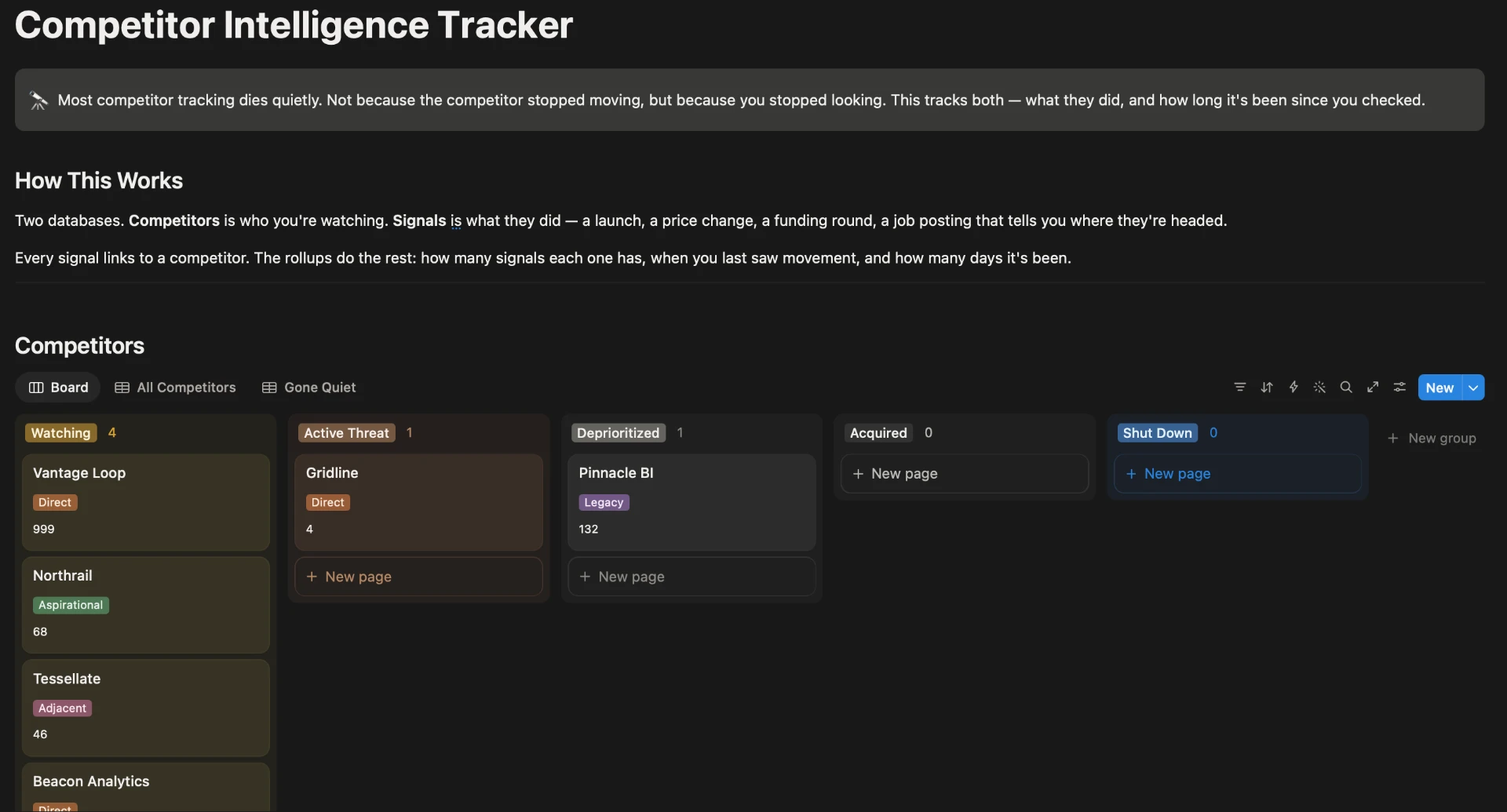
One row per competitor, with its category (direct, adjacent, aspirational or legacy), its status (watching, active threat, deprioritized, acquired or shut down), how it positions itself, where you win against it, and pricing notes. Each competitor shows its signal count, the date of its last signal, and Days Quiet.
Signals
One row per thing a competitor did: a launch, a pricing change, a positioning shift, a funding round, a key hire, a partnership or customer churn. Each signal records its type, its significance (noise, worth noting or act on), the source and date, and the competitor it's about. The Unlinked view catches signals you've captured but haven't assigned to a competitor yet, and Act On collects the ones that need a response.
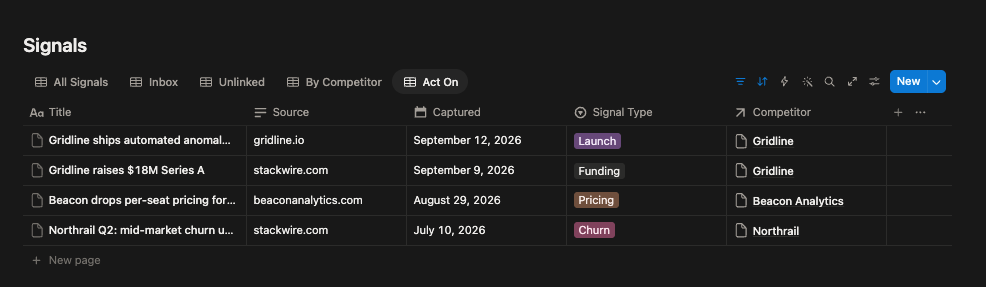
Comes with a worked example, a set of fictional competitors with their signals, so you can see every view working before you add your own.
How Days Quiet works
Days Quiet is the number of days since you last logged a signal for a competitor. It measures your attention, not their activity.
The Competitors view sorts by it, highest first, so the competitors you've stopped watching sit at the top. The Gone Quiet view lists every competitor with no signal in more than 60 days, leaving out any marked Acquired or Shut Down, since those are quiet for a reason. A competitor you've added but never logged a signal for shows 999, the template's marker for never tracked.
A quiet competitor means one of two things: nothing is happening, or you've stopped looking. Both are worth knowing, and only one is good news.
Last Reviewed is a separate date for when you last looked properly, even if you found nothing new.
Who it's for
- Product managers who own the competitive picture for their product area.
- Product marketers at small companies without a competitive intelligence team.
- Founders keeping track of a handful of competitors.
Who it isn't for
- Teams that want automated monitoring. This template doesn't watch websites for you. You log what you find, and it tells you when you've stopped finding things.
- Sales teams that need battlecards in front of reps during deals. Competitive intelligence platforms like Klue and Crayon are built for that.
- Organizations tracking dozens of competitors across several product lines.
Questions about tracking competitors
How do I track competitors in Notion?
Use two linked databases: one for competitors and one for signals, the things each competitor does. Log a signal when something happens, link it to the competitor, and track how many days it's been since each competitor's last signal. That last part is what keeps the tracker honest, because it shows you which competitors you've stopped watching. Competitor Intelligence Tracker sets this up for you.
How often should you check on competitors?
A common rhythm is a quick weekly scan for new signals, a monthly look at each competitor, and a deeper quarterly review of positioning and pricing, plus an immediate check whenever something big happens, like a launch, a price change or a funding round. The rhythm matters less than noticing when you've broken it, which is what Days Quiet shows.
How is this different from a free competitor analysis template?
Most competitor templates are profiles: a page per competitor with fields for pricing, features and positioning. Profiles go out of date the day you stop updating them, and nothing tells you when that happens. This template records signals over time and tracks the gap since the last one, so a stale competitor is visible instead of silently wrong.
Can I do competitive intelligence without a tool like Klue or Crayon?
Yes, for a small number of competitors. Those platforms add automated monitoring and sales battlecards, which are worth it at scale with a dedicated team. A small product team mostly needs a consistent habit and a shared record, and that's what this template provides.
What counts as a competitor signal?
Anything that would change how you position against them: a launch, a pricing or packaging change, new messaging, a funding round, senior hires or a hiring push, a partnership, or customers leaving them. Not every news mention counts. Log the doubtful ones as Noise so you can see what you looked at and dismissed.
Does Competitor Intelligence Tracker work on the free Notion plan?
Yes. It works on the free plan, on web, desktop and mobile. It's a one-time purchase on the Notion Marketplace.
Get Competitor Intelligence Tracker
$29, one-time · Works on the free Notion plan
Buy on Notion MarketplacePayment, delivery and updates are handled by the Notion Marketplace.
Related
- Research Repository OS: the customer side of the evidence, with insights linked to the studies behind them.
- Research Source Library (free template): capture the industry articles and reports you read alongside your competitor signals.
- All templates for product managers
Last updated: