Template
Interview Scorecard Template for Notion
Interview Loop & Scorecards
Interview Loop & Scorecards is a Notion template for structured hiring. You decide what the role needs to test, assign each signal to an interview, and collect a scorecard from every interviewer. It flags two problems before they cost you: signals nobody in the loop tests, and candidates you're about to decide on before everyone has submitted feedback.
Built for hiring managers at small and growing teams, by a former CX/UX researcher in big tech, now a strategist for early-stage startup teams.
$29 · Works on the free Notion plan
Buy on Notion MarketplaceWhy interview loops decide badly
Four interviewers. Three of them asked about system design. Nobody tested collaboration, the thing you said mattered most.
Then the debrief gets scheduled before everyone has written up, and the room decides anyway, usually on the strongest impression in it.
Both problems are invisible while they're happening. A long loop feels thorough, and a full debrief feels like enough feedback. Interview Loop & Scorecards makes both visible before the decision.
What's inside: four connected databases
Signals
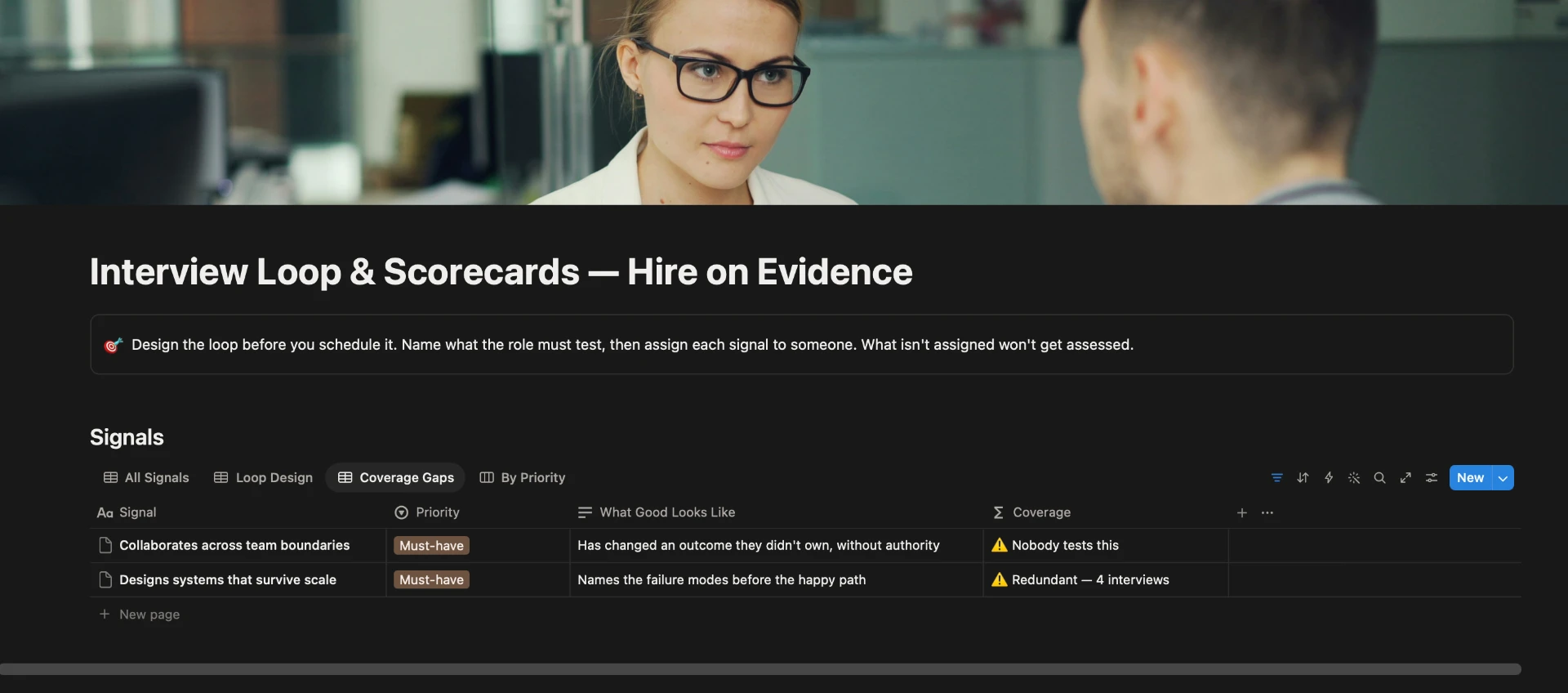
What the role must test: each signal with its priority and a note on what good looks like. Every signal shows how many interviews test it. The Coverage Gaps view lists signals nobody tests and signals tested too many times. Check it before you schedule anything.
Interviews
The loop itself, one row per stage: the interviewer, the format, the length, the signals that stage is responsible for, and a question bank written once and asked of every candidate. The By Interviewer view shows who's carrying the load.
Candidates
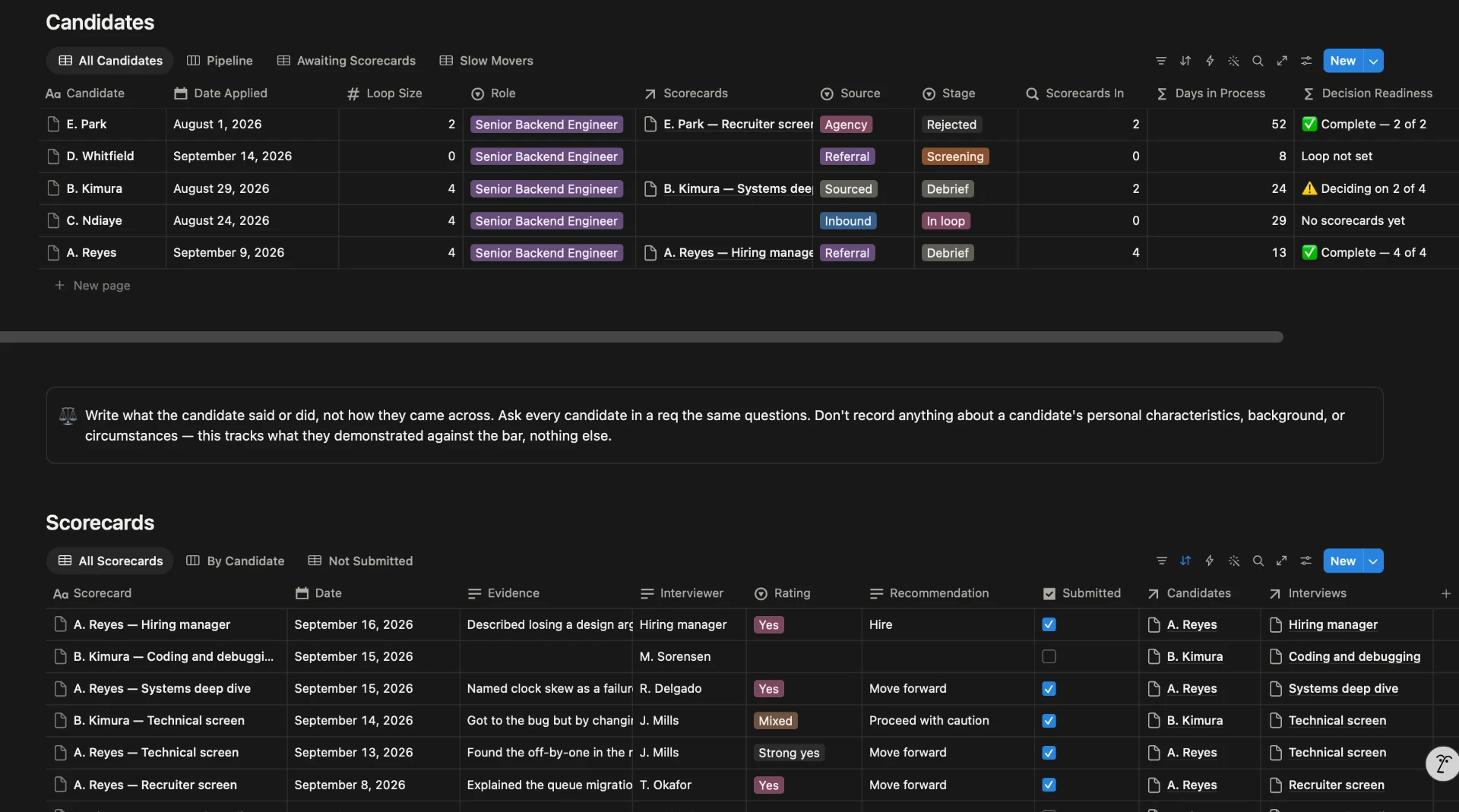
The pipeline from application to decision, with each candidate's Decision Readiness and days in process. Awaiting Scorecards lists candidates still missing feedback, and Slow Movers shows anyone in process more than three weeks.
Scorecards
One per candidate per interview: a rating from Strong yes to Strong no, the evidence behind it, and whether it's been submitted. The By Candidate view is the one to open in the debrief, and Not Submitted shows who still owes feedback.
Comes with a worked example, one fictional role with its signals, loop, candidates and scorecards, so you can see every view working before you add your own.
How it works
Signal coverage
Each signal's coverage depends on how many interviews test it.
| Interviews testing it | Verdict |
|---|---|
| 0 | ⚠️ Nobody tests this |
| 1 | Tested once |
| 2 or 3 | ✅ Tested |
| 4 or more | ⚠️ Redundant |
Both warnings matter. A signal nobody tests means you'll hire without ever assessing it. A signal tested four times means a long loop producing one opinion, four times over.
Decision Readiness
Each candidate's Decision Readiness compares submitted scorecards with the number of interviews in their loop.
| Verdict | Meaning |
|---|---|
| Loop not set | The candidate's loop size hasn't been entered |
| No scorecards yet | Nobody has submitted feedback |
| ⚠️ Deciding on 2 of 4 | Some feedback is in, but not all of it |
| ✅ Complete — 4 of 4 | Every interviewer has submitted |
Only submitted scorecards count. A draft isn't feedback, and counting it would make a candidate look ready when two interviewers haven't written anything.
Evidence, not impressions
The template is built around three rules: write what the candidate said or did, not how they came across; ask every candidate for a role the same questions; and record nothing about a candidate's personal characteristics, background or circumstances. It tracks what candidates demonstrated against the bar, and nothing else.
Who it's for
- Hiring managers who design and run their own interview loops.
- Startups hiring their first five to twenty people without a recruiting team.
- Managers who want hiring decisions they can explain afterward.
Who it isn't for
- Teams hiring at volume. An applicant tracking system handles job postings, candidate emails and scheduling. This template doesn't.
- Teams that need to store résumés and candidate contact details under a data-retention policy. Keep those in your applicant tracking or HR system.
Questions about structured interviews
What is an interview scorecard?
A short form each interviewer fills in after their interview: a rating against the signals that interview was assigned, and the evidence behind it, meaning what the candidate actually said or did. Scorecards are what make candidates comparable, because everyone is judged on the same signals in the same format.
How do I design a structured interview process?
List the signals the role must have, then assign each one to one or two interviews. Write the questions once and ask them of every candidate. Collect a scorecard with evidence from every interviewer, and make the decision only after all of them are in.
How many interviews should a hiring loop have?
Enough to test every must-have signal once or twice, which for many roles is four or five. Interviews beyond that usually test signals already covered, which makes the loop longer without adding information.
Should interviewers see each other's feedback before submitting?
No. Each interviewer should submit their scorecard before reading anyone else's, or the first opinion shapes the rest. Discuss in the debrief, after everything is in.
Can I use this instead of an applicant tracking system?
For a few roles with a handful of candidates each, it covers the part that decides the hire: loop design, scorecards and decision readiness. It doesn't post jobs, email candidates or store résumés. At higher volume, use an applicant tracking system for those, and this template for designing the loop.
Does Interview Loop & Scorecards work on the free Notion plan?
Yes. It works on the free plan, on web, desktop and mobile. It's a one-time purchase on the Notion Marketplace.
Get Interview Loop & Scorecards
$29, one-time · Works on the free Notion plan
Buy on Notion MarketplacePayment, delivery and updates are handled by the Notion Marketplace.
Related
- Executive OS: once they're hired, run 1:1s, meetings, action items, priorities and decisions in one connected system.
- Career Growth Tracker: the same evidence-against-the-bar approach, applied to promotion cases.
- All templates for people managers
Last updated: