Template
Free Research Source Tracker for Notion
Research Source Library
Research Source Library is a free Notion template for keeping track of what you read for work: articles, market reports, papers and posts. Each source gets its author, publication, publication date, the date you captured it and a short excerpt as real fields, so you can filter, sort and find it again months later.
Built for product managers and researchers doing desk research, by a former CX/UX researcher in big tech, now a strategist for early-stage startup teams.
Free · Works on the free Notion plan
Get it free on Notion MarketplaceWhere your reading goes missing
Every piece of research starts with reading, and most of that reading disappears: a link pasted into a doc, a tab you meant to come back to, an article you half-remember six months later when you need to cite it.
Bookmarks don't help much. They save the link, but not who wrote it, where it was published, when, or why it mattered to you. Research Source Library keeps those details with the link.
What's inside
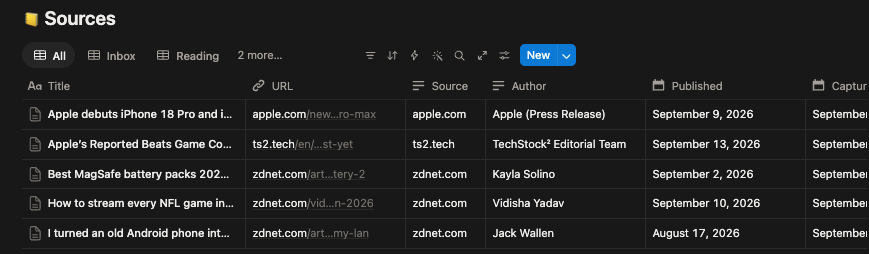
One database with ten fields for each source: title, link, source, author, publication date, the date you captured it, an excerpt, its type (article, paper, report, post or other), its status, and your notes. New pages open with two prompts: "Why I kept this" and "What it argues."
Five views sit on top of it:
Inbox
Everything you've captured but haven't read yet, newest first. The default view and your reading queue.
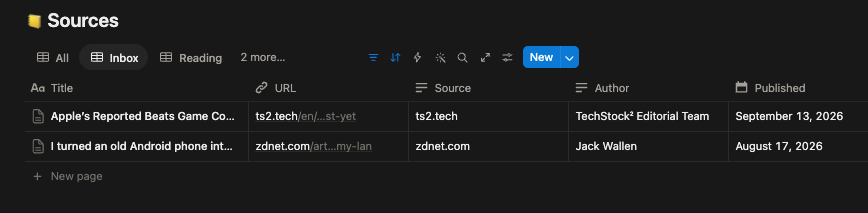
Reading
What you're partway through.
By Source
Your sources grouped by publication. Seeing eleven items from one publication tells you something about your own reading.
Processed
Sources you've read and taken notes on.
All
Everything, unfiltered.
Add sources by hand, or clip them with a browser extension that fills in the fields for you. Everything works the same either way.
Comes with sample sources so you can see every view working before you add your own.
How it works
From inbox to processed
| Status | Meaning |
|---|---|
| Inbox | Captured, not read yet |
| Reading | In progress |
| Processed | Read, with notes on what it argues |
| Archived | Kept, but no longer relevant |
Processed is the finish line here: you've read it, and you've written down why you kept it and what it argues. Those two notes are what make a source findable later, because you'll search for what it said, not what it was called.
Moving up to Research Repository OS
Research Repository OS has a Sources database with the same ten fields, plus links to the insights and studies each source supports. Because the fields are identical, the sources you collect here move across unchanged.
Who it's for
- Product managers and researchers doing desk research.
- Anyone collecting market, industry and competitor reading for work.
- Teams that want one shared reading list instead of links scattered across docs and chat.
Who it isn't for
- Academics managing citations and bibliographies. A reference manager like Zotero is built for that.
- Teams that need to connect each source to the insights it supports. Research Repository OS does that.
Questions about tracking research sources
How do I keep track of articles and sources for research?
Use one database where each source is a row, with its title, link, author, publication, publication date and a short excerpt as separate fields. Add a status so you can tell what you've read from what you've only saved. Research Source Library is set up this way.
Is there a free research tracker template for Notion?
Yes. Research Source Library is free on the Notion Marketplace and works on the free Notion plan, on web, desktop and mobile.
Can I use Research Source Library with Zotero?
Not directly; there's no sync between them. Zotero is a reference manager and is better for academic citations and bibliographies. Research Source Library is for work research: articles, reports and posts that need to stay findable and connect to decisions.
What should I record for each source?
The title, link, author, publication, publication date, the date you found it, a short excerpt, and a note on why you kept it. The note matters most, because months later you'll remember what a source said long after you've forgotten its title.
How do I move my sources into Research Repository OS?
The two templates use the same ten fields, so pages moved from this database into the Sources database in Research Repository OS keep their fields. Then link each source to the insights it supports.
Can a team share one library?
Yes. Put the page in a shared space and everyone can add sources. The By Source view then shows where the whole team's reading comes from.
Get Research Source Library
Free · Works on the free Notion plan
Get it free on Notion MarketplaceDelivered through the Notion Marketplace.
Related
- Research Repository OS: connect sources to the insights and studies they support, with evidence strength for each insight.
- Evidence Strength Calculator (free tool): score how well a single finding is supported.
- Competitor Intelligence Tracker: log what competitors do as signals, and see which ones you've stopped watching.
- All templates for product managers
Last updated: