Template
Free Employee Feedback Tracker for Notion
Performance & Feedback Tracker
Performance & Feedback Tracker is a free Notion template that keeps a running log of feedback on each of your direct reports, so performance reviews draw on the whole year instead of the last two weeks. Each note takes about ten seconds to log, and every report shows whether you have enough notes to write a fair review.
Built for managers who write performance reviews, by a former CX/UX researcher in big tech, now a strategist for early-stage startup teams.
Free · Works on the free Notion plan
Get it free on Notion MarketplaceWhy reviews end up describing two weeks
Something notable happens in March. By November you're writing a review, and what you remember is the last few weeks. That's recency bias, one of the most common errors in performance reviews. It shortchanges people whose best work came early in the year, and it gives the latest mistake more weight than it deserves.
The other problem is unevenness. Most managers have plenty of notes on one or two people and almost none on someone quiet and steady. That person gets the thinnest review, and often it's not because their year was thin.
Performance & Feedback Tracker catches both before review season starts.
What's inside: two connected databases
Team
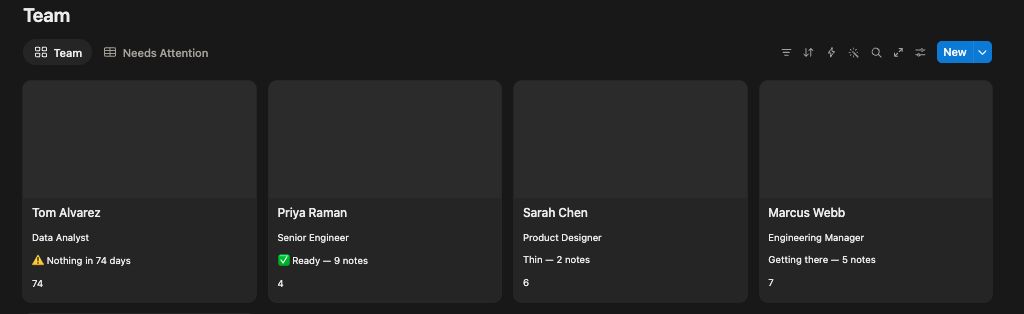
A row for each direct report, showing how many notes you've logged, when you last logged one, and their Review Readiness. The Team view puts that on a card for each person, and Needs Attention lists anyone with fewer than four notes or nothing logged in over 60 days, longest gap first.
Feedback Log
One row per moment worth remembering: who it was about, when, whether it was praise, constructive or an observation, the theme, the impact, and where it came from, whether you saw it yourself or heard it from someone else. Five views sit on top of it:
- All Feedback, newest first
- By Person, the view to open when you sit down to write a review
- This Quarter, the last 90 days
- Balance, grouped by type, which shows whether you mostly log praise or mostly log problems
- Not Yet Used, notes that haven't made it into a review yet
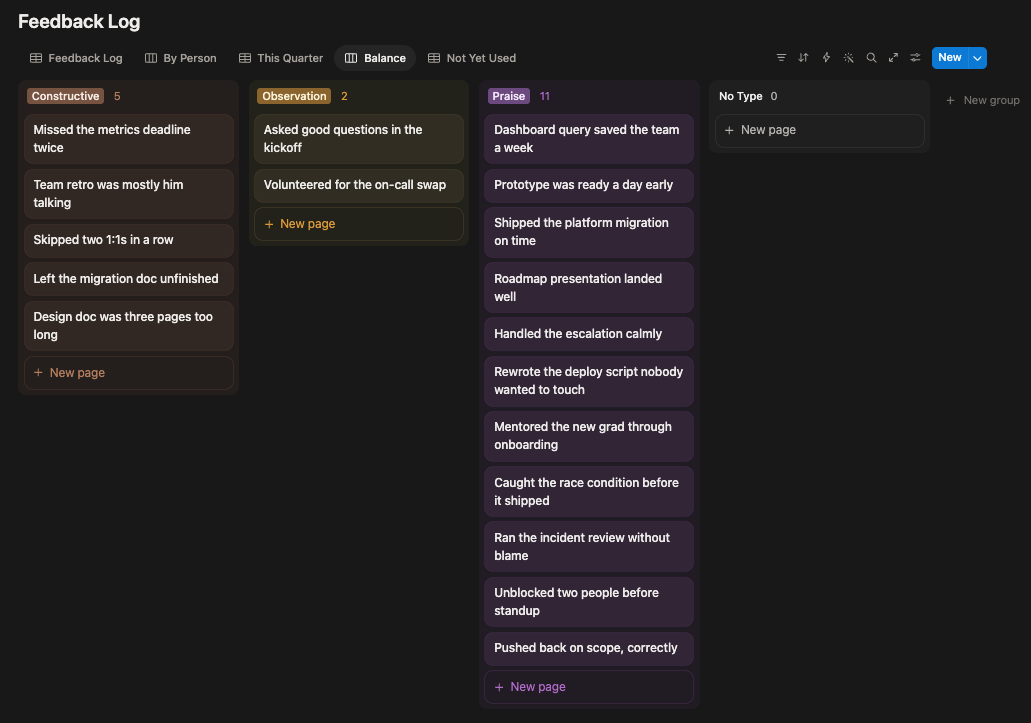
Comes with a sample team and about sixteen notes, so you can see every view working before you add your own.
How Review Readiness works
Each report's Review Readiness depends on how many notes you've logged and how recently.
| Verdict | Rule |
|---|---|
| ✅ Ready | 8 or more notes |
| Getting there | 4 to 7 notes |
| Thin | 1 to 3 notes |
| ⚠️ Nothing in N days | No note in more than 60 days, however many exist |
| Nothing logged yet | No notes at all |
The gap is checked before the count. Someone with ten notes from the first half of the year and nothing since is flagged, not marked ready, because a review written from those notes would describe half a year.
Where a note came from matters too. Something you saw yourself and something you heard secondhand carry different weight, so each note records its source. Treat secondhand feedback as a lead to check before it goes into a review, not as a fact.
Who it's for
- Managers writing reviews for three or more people.
- New managers heading into their first review cycle.
- Managers who've inherited a team partway through the year.
Who it isn't for
- Companies that need a full performance management system, with ratings, calibration workflows and approvals. HR platforms like Lattice, 15Five and Culture Amp are built for that.
- Sensitive HR records, such as formal performance plans, disciplinary matters, or health and personal information. Those belong in your company's HR system, not a personal Notion page.
Questions about tracking feedback
How do I keep track of employee feedback for performance reviews?
Log each notable moment the day it happens: who it was about, the date, what happened, whether it was praise or constructive, and whether you saw it yourself. By review time you have a year of notes instead of a few weeks of memories. Performance & Feedback Tracker is set up for exactly this.
Is there a free performance review template for Notion?
Yes. Performance & Feedback Tracker is free on the Notion Marketplace and works on the free Notion plan, on web, desktop and mobile.
How do I avoid recency bias in performance reviews?
Keep notes through the whole year, then check that each person has notes from every part of it before you write. If someone's notes all come from the last month, the review will describe the last month. A gap flag like Review Readiness shows you this before you start writing.
How many feedback notes do I need to write a fair review?
There's no fixed number. What matters is notes spread across the year, so no single period dominates. The template treats eight or more as ready, roughly one every six weeks, and flags anyone with no note in over 60 days.
Should I include feedback I heard secondhand?
Yes, but as a lead, not a fact. Record where it came from, then confirm it yourself or with the person who saw it before it goes into a review.
What's the difference between this and Executive OS?
Performance & Feedback Tracker does one job: a record of feedback for writing reviews. Executive OS runs the rest of a manager's week: 1:1s, meetings, action items, quarterly priorities and a decisions log.
Get Performance & Feedback Tracker
Free · Works on the free Notion plan
Get it free on Notion MarketplaceDelivered through the Notion Marketplace.
Related
- Executive OS: run 1:1s, meetings, action items, priorities and decisions in one connected system.
- 1:1 Meeting Tracker (free template): see who you're overdue to meet, and carry open items forward.
- Why most brag documents don't get anyone promoted: the same record-it-as-it-happens idea, from your report's side.
- All templates for people managers
Last updated: